
If you’ve ever spent hours creating your freebie or lead magnet only to see little to no sign-ups, you’re not alone. As a MailerLite expert and Canva designer for entrepreneurs, I’ve seen how even small design details can make or break your conversion rate.
The good news? You don’t need to be a professional designer to fix it. In this post, I’ll walk you through five common Canva design mistakes that silently hurt your lead magnet performance, and exactly how to avoid them.
Whether you’re creating a workbook, checklist, or free mini-course, these tips will help you design something that not only looks great but actually converts.
Mistake #1: Using Too Many Fonts and Colors
It’s tempting to experiment with all the beautiful fonts Canva offers, but mixing too many creates visual noise. When your reader has to work to understand your message, they lose interest fast.
The Fix:
Stick to a simple, cohesive palette. Choose one main font for headings and one easy-to-read font for body text. For colors, limit yourself to two or three brand shades that represent your business.
Consistency builds recognition. When your lead magnet matches your brand look, people remember you.
Pro Tip:
Use Canva’s Brand Kit feature to store your colors, logos, and fonts so every new design stays on brand automatically.
Mistake #2: Ignoring White Space
Many creators feel the need to fill every inch of their PDF with text, shapes, or icons. But cluttered pages overwhelm the eye.
The Fix:
White space isn’t wasted space; it’s breathing room for your content. Use margins, line breaks, and padding around elements. This makes your design cleaner and your message easier to digest.
In fact, minimal designs often convert better because they draw attention to the most important element: your call-to-action.
Pro Tip:
After finishing your design, step back and remove one or two non-essential elements. Simplicity communicates confidence.
Mistake #3: Weak or Hidden Calls-to-Action (CTAs)
Your lead magnet’s purpose is to build a connection and guide readers toward the next step. Yet, many PDFs bury the CTA at the end or forget it entirely.
The Fix:
Your CTA should be clear, visible, and benefit-driven. Instead of “Click here,” try:
“Grab your next free template.”
“Join my email list for Canva tips”
“Book your setup call today.”
Use Canva buttons or bold text boxes in your brand color to make CTAs pop.
Pro Tip:
Add a CTA on the first and last pages of your freebie. Repetition helps readers remember what to do next.
Mistake #4: Not Optimizing for Mobile Viewing
Did you know many people open PDFs directly from their phones? A layout that looks perfect ona desktop might appear tiny or broken on mobile.
The Fix:
Design with mobile in mind from the start.
Keep text large (no smaller than 14pt)
Use single-column layouts
Avoid thin lines or detailed backgrounds
Pro Tip:
Before finalizing, download your Canva PDF and preview it on your phone. If you need to zoom in to read, your audience will likely skip it.
Mistake #5: Forgetting the “Flow” of the Experience
Your lead magnet isn’t just a document; it’s an experience.
If your content jumps around or lacks hierarchy, readers will feel lost.
The Fix:
Plan your structure before you design.
Start with a clear cover page that communicates the benefit (“The 3-Step Lead Magnet Checklist”)
Follow with a welcome or instruction page
End with a CTA or bonus tip
Pro Tip:
Use Canva’s Page Manager to rearrange pages and keep the story flow logical and engaging.
Bonus: Use Templates Strategically
Templates are time-savers, but they need to be customized. Too many creators leave placeholder fonts, colors, or generic icons untouched.
The Fix:
Make every design yours. Replace template visuals with brand-specific images, your logo, and custom icons. Even small tweaks make your freebie look polished and authentic.
Pro Tip:
Create your own “base” Canva template you can reuse for all freebies. It saves hours and ensures every design looks consistent across your brand.
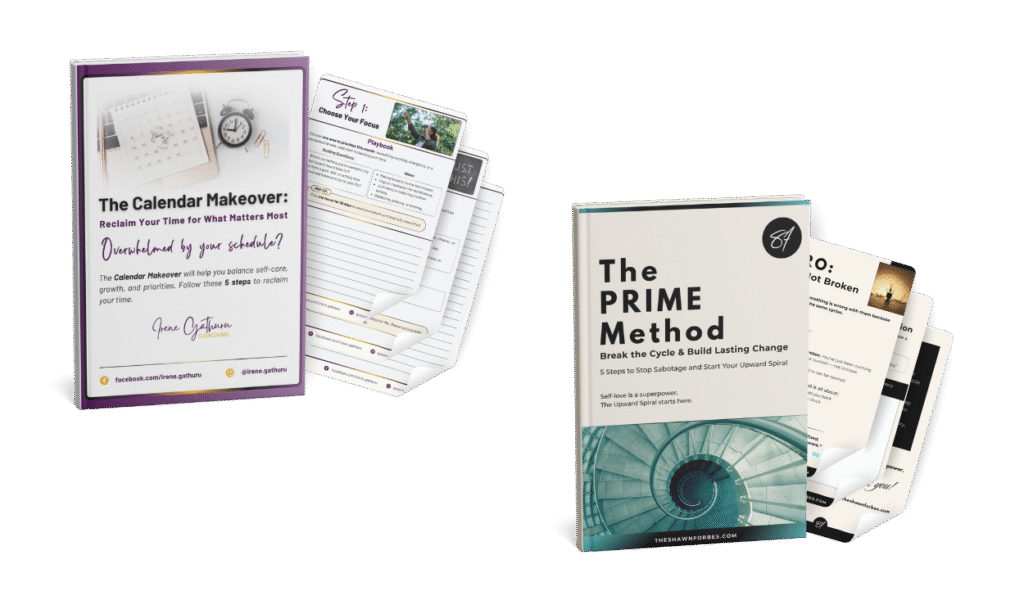
Designs created for clients.
Bringing It All Together
Designing a lead magnet that converts isn’t about fancy graphics; it’s about clarity, structure, and user experience.
When you avoid these common Canva mistakes, your freebie not only looks professional but also encourages people to take the next step with you.
And remember, you don’t have to figure it all out alone.
As a MailerLite expert and Canva designer for entrepreneurs, I help clients turn their ideas into lead-generating assets, without the design overwhelm.